
When a Winner Doesn’t Pay (Expired Items)
If a winner doesn’t check out in time, their item is marked Expired — but nothing is stuck. You can resend their link, offer the item to the next bidder, or sell it to someone else — all from your dashboard.
- Winners have until your payment deadline (up to 24 hours) to pay.
- Unpaid items show up under Needs Attention on your dashboard once the deadline passes — they show an Expired status.
- From the item’s actions you can resend the link, offer the next bidder, or sell to someone else.
Prefer to watch? This clip jumps to what happens after the checkout DMs go out — including when a winner doesn’t pay.
What the “Expired” status means
Each winner has until your payment deadline to complete checkout. If they don’t, their checkout link stops working and the item’s status changes to Expired, appearing under Needs Attention on your dashboard, so it’s easy to spot. The expired item is also removed from that customer’s order on your Orders page — and if it was the only item in their order, the whole order is removed.
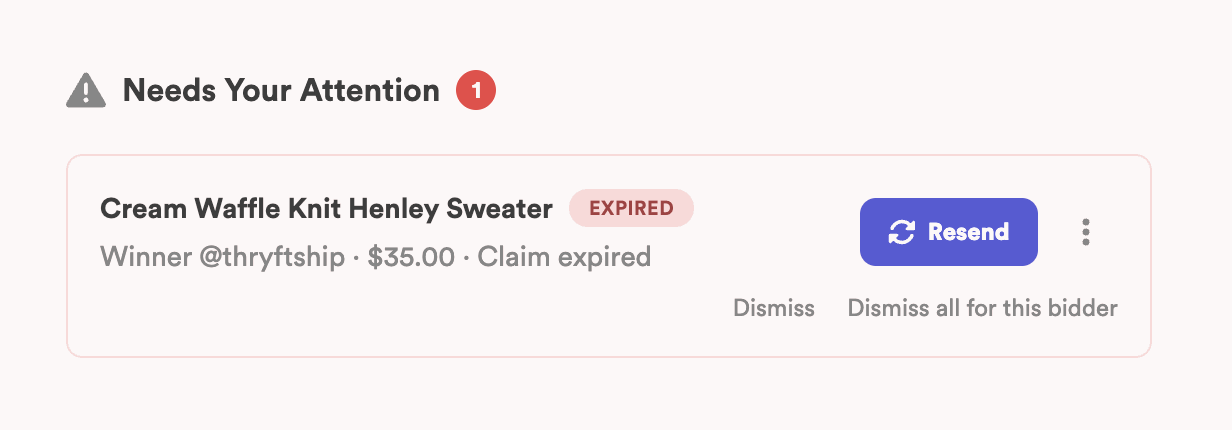
Your options
Resend the checkout link
This gives the winner another chance to pay. When you resend, you’ll see two choices:
- Send automatically — the assistant DMs the customer their checkout link again. This is the one we recommend.
- Send manually — you get a generic Thryft Ship checkout link to share yourself, and the customer types in their Instagram handle at checkout.
More actions (the three dots)
Click the three dots (···) on the item to:
- Offer to the next bidder — pass the item to the runner-up at their bid; they get their own checkout link.
- Sell to someone else — assign the item to a specific customer.
- Mark as unsold — close it out if no one ends up taking it.
Common questions
What happens to the order when an item expires?
The expired item is removed from that customer’s order on your Orders page. If it was the only item in their order, the whole order is removed.
What does “Expired” mean on an item?
It means the winner didn’t check out before your payment deadline, so their checkout link no longer works. The item moves to Needs Attention, where you can resend the link, offer it to the next bidder, or sell it to someone else.
How long does a winner have to pay?
Up to your payment deadline — a maximum of 24 hours after they win. You set it in your settings.
Where do unpaid items show up?
Under Needs Attention on your Sales Assistant Dashboard once the checkout expires.
Can I give them one more chance?
Yes — use Resend checkout link from the item’s actions to reopen their payment window.
Still seeing a stuck order? Reach out and we’ll help you sort it.


