
Shipping internationally? You’ll fill out a quick customs form so your package can cross the border smoothly. It looks like a lot at first, but here’s every field, explained simply.
- Customs info tells the destination country what’s in your package, its value, and why you’re sending it.
- It appears for your international destinations: Canada, Australia, US territories, and military bases.
- Add each item as its own line with a description, harmonization code, quantity, weight, and value.
What is customs information?
It helps international customs agencies understand the contents, value, and purpose of your shipment, so your package can legally and smoothly travel across borders. A customs form covers the contents, the quantity and value of the items, and the reason for shipping (a sale, a gift, etc.). Without accurate info, a package can face delays, fines, or even be returned — so it’s worth getting right.
When does the customs form pop up?
You’ll see it when you create a label for any international destination. On Thryft Ship that means Canada, Australia, US territories, and military bases. Once you pick an international address, the system automatically walks you through the required fields.
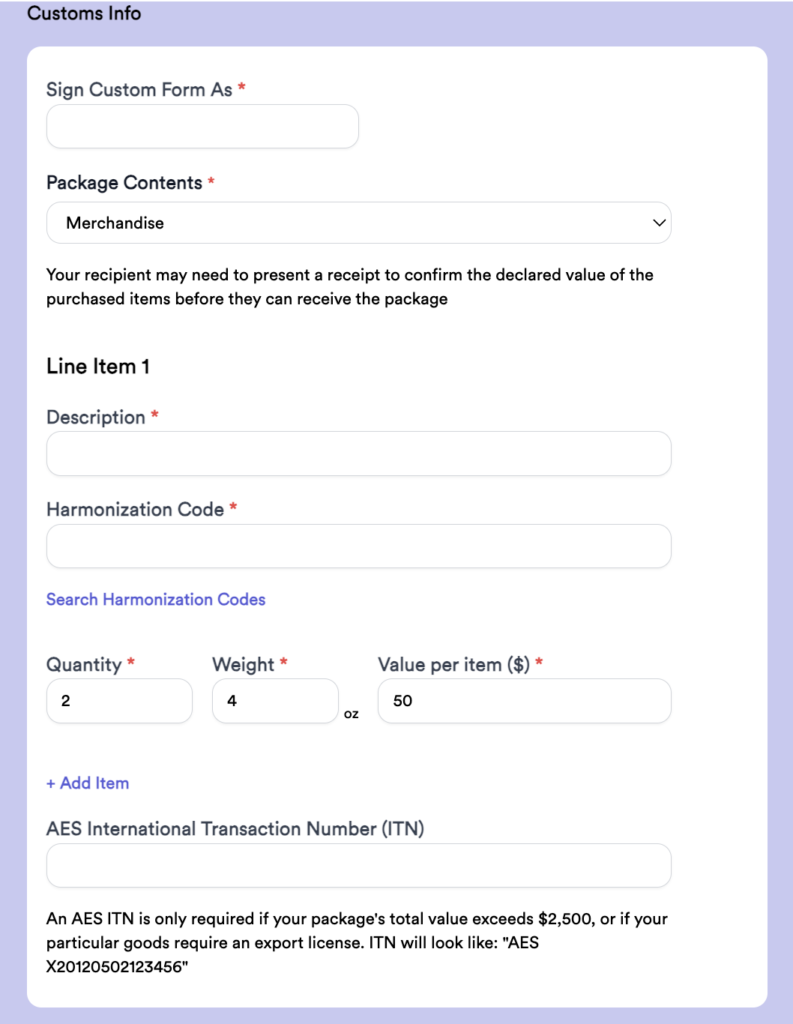
Each field, explained
- Sign Custom Form As
Your digital signature — enter your name as it appears on your account or business. This confirms the info is accurate to the best of your knowledge.
- Package Contents
Pick the type of items from the dropdown: Merchandise (items sold), Gift (a present), or Documents (paperwork). For merchandise, the recipient may need to show a receipt to confirm the declared value.
- Line Items (+ Add Line Item)
Enter each different type of item as its own line (multiples of the same item stay together — see below). Shipping a tee and jeans? That’s two lines — e.g. Cotton T-shirt, HS code 610910, qty 1, 4 oz, $20 and Denim jeans, HS code 620342, qty 1, 16 oz, $50. Click + Add Item for each additional item.
- Harmonization Code (required)
Each line item needs an HS tariff code that classifies the goods for customs. Use the Search Harmonization Codes link on the form to find yours — here’s a full guide to harmonization codes.
Example — two cotton t-shirts: Description Cotton T-shirt, HS code 610910, Quantity 2, Weight = 8 oz (both shirts together), Value per item $20.


