
What to Do If a Message Didn’t Send to a Customer
Once in a while a checkout message doesn’t reach a customer — usually because Instagram wouldn’t deliver the DM. Here’s how to get them their link.
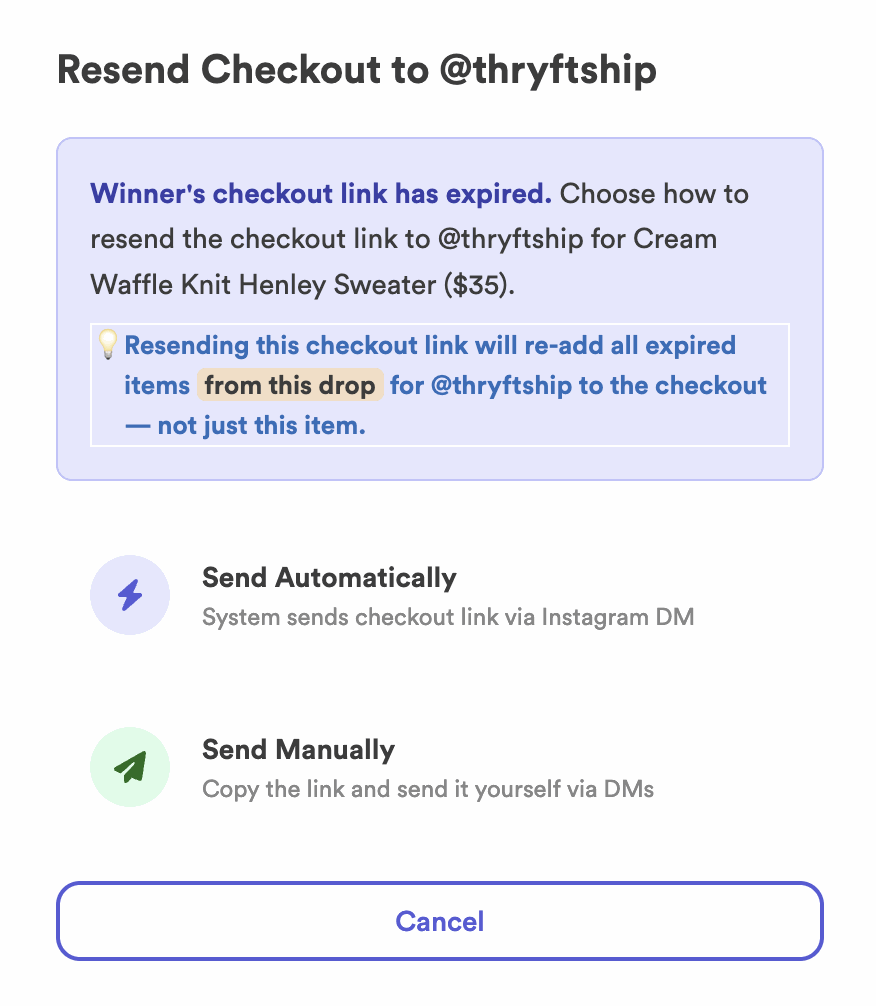
- Recommended: Resend Checkout and choose Send Automatically.
- Still stuck? Copy the checkout link and send it to that customer only — it’s unique to them.
- Want a generic checkout? Choose Send Manually and share your normal link; they enter their IG handle.
Try these, in order
-
Resend and choose “Send Automatically”
This is what we recommend. On the item, choose Resend Checkout and pick Send Automatically — the assistant DMs the customer their checkout link again.
-
Still didn’t go through? Send the link yourself
Copy the checkout link from the DM and send it straight to that customer.
-
Prefer a generic checkout? Choose “Send Manually”
Pick Send Manually instead, then share your normal Thryft Ship checkout link. The customer simply types in their Instagram handle at checkout.
Common questions
Why didn’t the message send?
Usually Instagram couldn’t deliver the DM (for example, the customer’s message settings). Resending generates a fresh link to try again.
Will Resend Checkout create a new link?
Yes — it sends the customer a fresh checkout link and reopens their payment window.
What if they still never get it?
Use Sell to Someone Else, or see When a Winner Doesn’t Pay for more options.
Message still not going through? Reach out — we’ll take a look with you.


