
Accept Venmo at Checkout
Your Venmo handle can now live right on your checkout page. Your customer picks it, pays, and tells you. You tap one button to confirm. No handle in the DMs, no payment requests, no “hey, did that go through?”
- Turn on Pay with Venmo and your handle shows up as an option at checkout.
- The money goes straight from their Venmo to yours. We don’t process it.
- They tap Yes, I paid → you tap Confirm → the order updates itself.
- No 2% fee on Venmo orders, and they don’t count toward your payment volume.
- You need Thryft Ship Payments on first, and Venmo asks you to use a business account.
What actually changes
- You type out your handle and the total
- They ask what shipping costs
- You send a payment request
- You open Venmo to check, then update the order
- Somebody messages “did you get it?”
- The total and shipping are already on the page
- They tap Venmo and pay
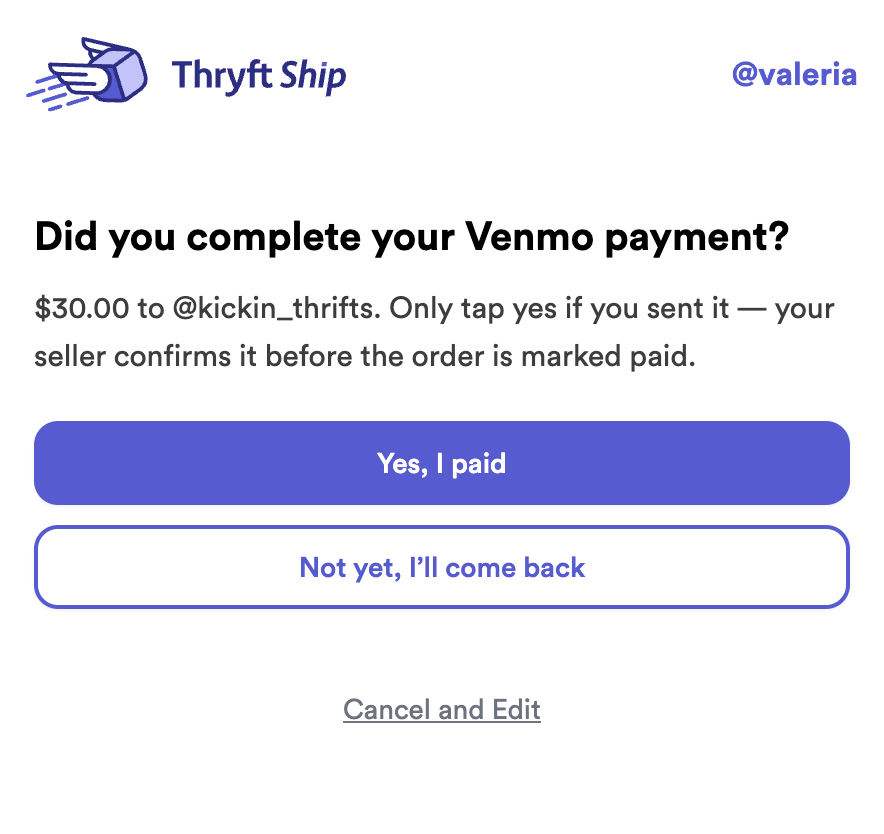
- They tap Yes, I paid
- You check Venmo and tap Confirm
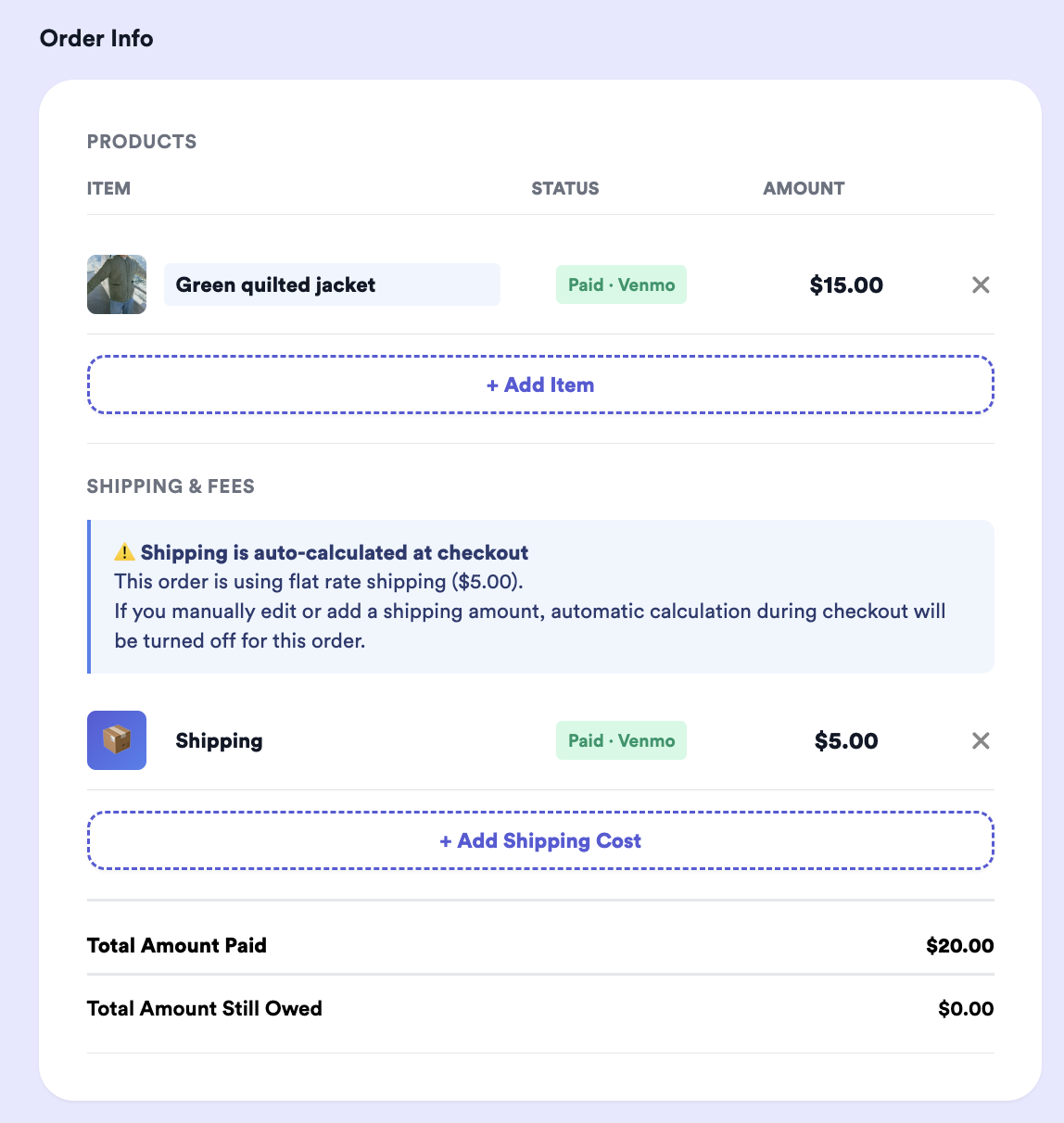
- Every line updates itself
Two taps for them, one for you — and it all lands on the order.
Now multiply that by every buyer in a drop. Ten minutes of back-and-forth on a $30 sweater, twenty times over, is most of your evening. That’s the part this gives back — to you and to them.
Two ways to get paid
Once it’s on, your checkout page offers both. They work differently, and that’s worth knowing.
Card, Apple Pay, Google Pay, Cash App, Klarna, Balance
- Lands in your balance, then your bank on payout day
- The order marks itself paid
- Receipt and refund button in the app
- 2% on items only, never shipping
- Builds your payment volume
Buyer is sent to venmo.com/yourhandle
- Goes straight to your Venmo
- You confirm it once you see it land
- Refunds and receipts live in Venmo
- No platform fee
- Doesn’t add to your payment volume
You confirm Venmo payments yourself because Venmo doesn’t let outside apps look into your account. So instead of guessing, we hand you a prompt at the right moment.
Why it needs Payments turned on
Pay with Venmo shows up once Thryft Ship Payments is on — Stripe onboarding done, regular checkout live. Two reasons.
Your buyers get more ways to say yes. Not everyone uses Venmo. Some want to tap Apple Pay and be done in four seconds. The more ways to pay while they’re still excited, the more of them actually do.
It shows you’re the real deal. Onboarding verifies your business — name, bank, identity. Your buyer is sending money to someone they found on Instagram, and a verified checkout page with a receipt and tracking tells them you’re legit. Same as your reviews and your sold-out drops: it adds up to a reputation.
Turning it on
-
Open Accepting Payments
It’s in your payment settings. Not set up yet? A Complete Guide to Thryft Ship Payments walks you through it.
-
Find “Pay with Venmo” and type your handle
Exactly as it appears in Venmo. The screen shows you the link buyers will get — venmo.com/yourhandle — so check the spelling there.
-
Tap “I understand, enable Pay with Venmo”
One time only. It’s the same five points as this article, in about five lines.
-
Flip the toggle
Done. Venmo now shows up on your regular customer link and your Sales Assistant checkout links. Turn it off any time.
What your buyer sees
-
The usual options, plus one
Card, Apple Pay, Google Pay, Cash App, Klarna and Balance sit at the top like always. Venmo is just below, under Other payment options.
-
We tell them to come back
Before we send them over, they see a reminder that paying in Venmo doesn’t finish the order — they have to return and confirm. Then they tap Got it, take me to Venmo.
- They pay you on Venmo
Straight to your profile, amount already worked out — items and shipping together. No math, no asking you what they owe.
-
They come back and tell you
One question, two buttons. Yes, I paid sends you the confirmation card. Not yet, I’ll come back leaves the order open so they can finish later.
When they say they paid
A card appears at the top of that order, telling you the amount, the time, and how many items it covers.
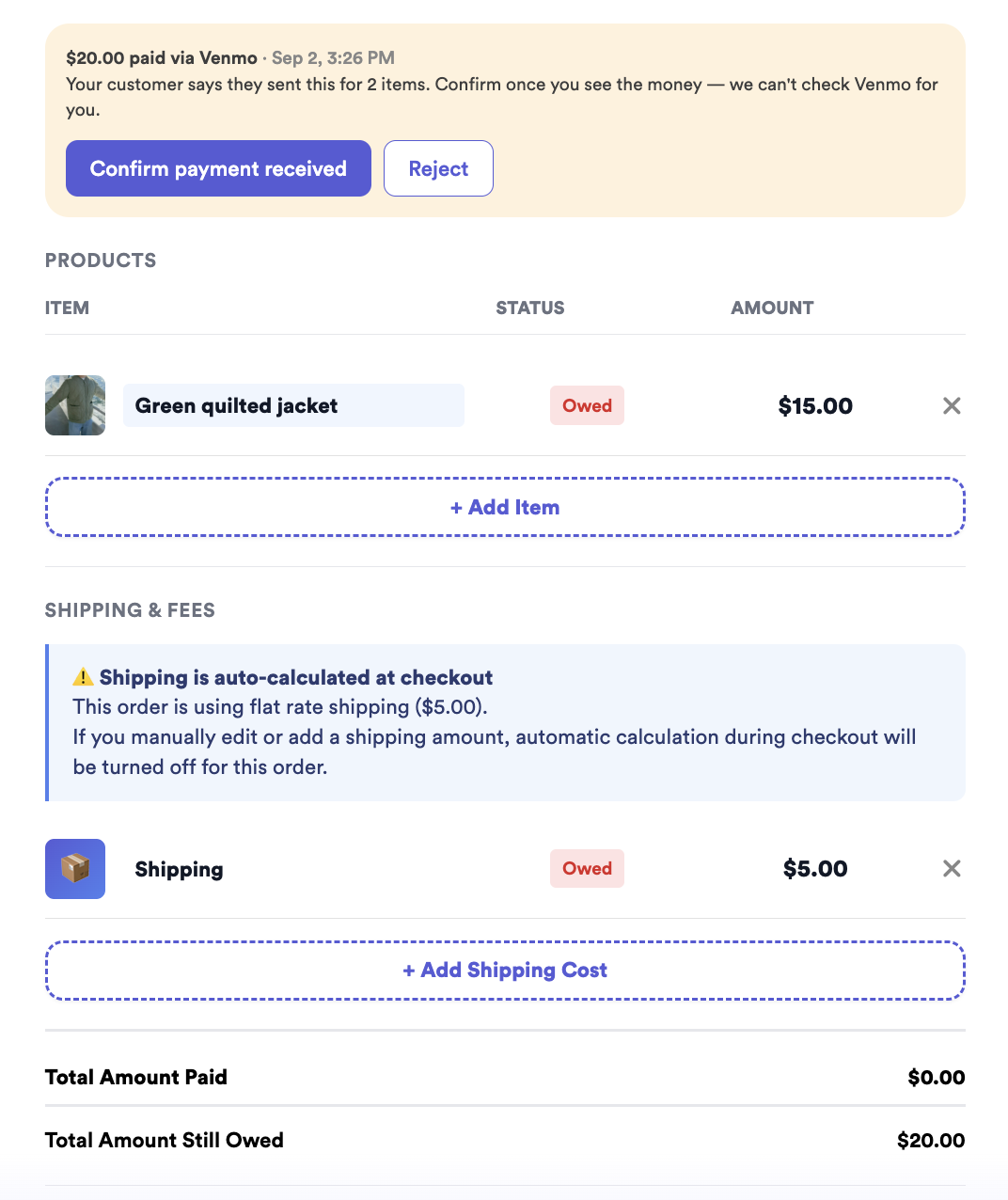
Open Venmo, find the payment, come back and tap Confirm payment received.
Not there? Tap Reject. The order stays owed and your buyer can try again, on Venmo or by card.
Paid part of it on Venmo and still owe the rest? A Customer Still Owes You After You Shipped? How to Collect has you covered.
- The Sales Assistant stops chasing. If the item came from a drop, confirming marks it sold via Venmo and switches off the reminder DMs — nobody gets nagged for money they already sent.
- You can print the label whenever. Confirming isn’t required for that. Just make sure the money’s in before you ship.
Two things to remember
Nothing is paid until you confirm it. An order never marks itself paid because a buyer said so. When the card shows up, that’s your cue to check Venmo.
No 2% fee, and no payment volume. Our fee is 2% on items only, never shipping — and on a Venmo order it’s zero, since we’re not processing anything. What comes with that: no automatic paid status, no receipt in the app, no refund button, no protection, and nothing added to your payment volume. On a $30 sweater the fee would’ve been 60¢. Some days that’s worth it, some days the tracked version is.
One rule from Venmo
Venmo asks that you use a business account for selling. Personal accounts aren’t meant for business with people you don’t know personally, and using one can mean held funds or a limited account.
We can’t see inside your Venmo, so this one’s yours to set up. Switching to a business profile takes a few minutes in the app.
Prefer PayPal?
PayPal works the same way — an external option your buyer pays outside Thryft Ship, which you confirm when the money lands. You can offer both. See Accept PayPal at Checkout.
What else you get
- Free to start — create orders and buy discounted USPS labels, no subscription.
- Payments at 2% on items only, with card, Apple Pay, Google Pay, Cash App, Klarna and balance built in.
- The option to collect sales tax at checkout. You choose whether to collect and which states to collect in — then it’s worked out for you at checkout instead of guessed at.
- Itemized orders with shipping attached, so what you sold and what you shipped live together.
- The option to upgrade to the Sales Assistant whenever you’re ready — $29.99/month with a free week. It runs the drop, reads the bids and sends checkout for you.
That last one is the real time-saver. A drop run by hand — comments, bids, winner DMs, orders, chasing payment — takes most sellers five or six hours. With the Sales Assistant it’s closer to one.
Run your next drop with the bids read, the winners turned into orders, and checkout sent automatically. One week free — then $29.99/month, cancel anytime.
Start your free trialAlready have an account? Turn it on in Sales Assistant settings.


