
How to End a Drop (and What “Paused” Means)
Your drop ends on its own when the auction time runs out — but you can also end it early whenever you like. And if you ever see “Paused,” that’s something different. Here’s the rundown.
- A drop ends automatically when its auction length (6, 12, or 24 hours) runs out.
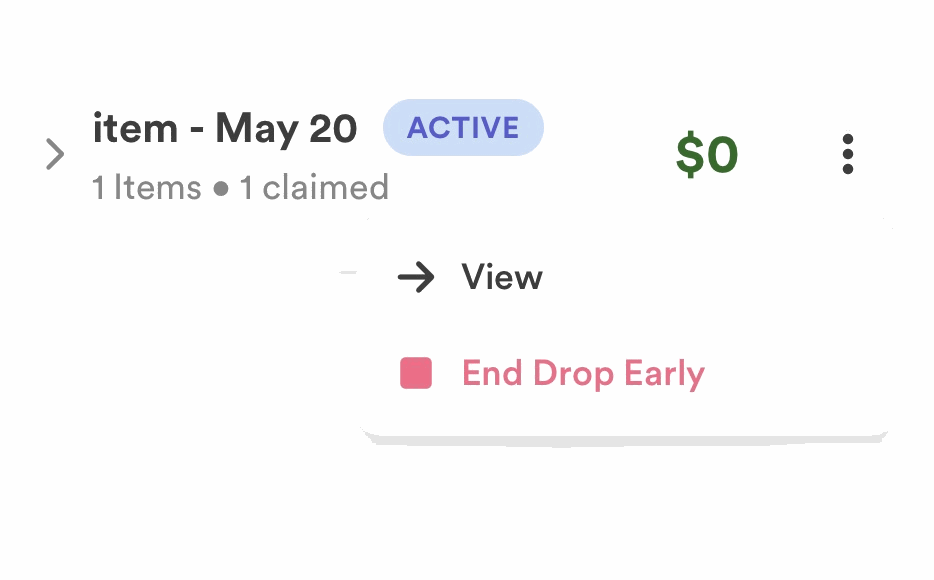
- You can End Drop Early to wrap it up sooner — winners are finalized and sent checkout links.
- “Paused” is not the same as ended — it means Instagram’s daily posting limit was hit while posting.
Prefer to watch? This clip jumps to how to end a drop early — and exactly what happens when a drop ends.
How a drop ends normally
When you create a drop you choose an auction length — 6, 12, or 24 hours. When that time is up, the drop ends on its own: the highest bidder on each item wins, and the assistant sends every winner a checkout link. See How Checkout Works for what happens next.
Ending a drop early
Want to wrap up before the timer runs out? Use End Drop Early. It finalizes the drop right away — current high bidders win their items and get their checkout links, just like a normal ending.
What “Paused” means
If your drop shows Paused, it hasn’t ended — it ran into Instagram’s limit of 50 automated posts per day while posting your items. The items already posted are live and working; the rest are just waiting.
The quickest way to get the rest up is to post them on Instagram yourself and link them back to your drop. Full steps are in What to Do If Your Drop Has More Than 50 Items.
Common questions
What happens to bids when I end a drop early?
The current highest bidder on each item wins and gets a checkout link — exactly like a normal ending.
Is “Paused” a problem?
No. It just means the drop hit Instagram’s 50-posts-a-day limit while posting. Your live items keep working; post and link the rest to finish.
Can I add more time instead of ending?
Auction length is set per drop (6, 12, or 24 hours). To keep selling, you can always start a new drop.
Not sure whether to end early? Reach out — we’re happy to talk it through.


