
Can't Find Your Bank? Enter Your Details Manually
Setting up where Thryft Ship sends your payouts and don't see your bank in the list? You're not stuck — you can type your bank details in by hand and be done in about a minute.
- When you set up your payout account, Thryft Ship shows a list of common banks to connect. If yours isn't there, you can still add it.
- On the “Select an account for payouts” screen, click “Enter bank details manually instead.”
- Type in your routing number and account number, and your payouts are set.
How to enter your bank details manually
-
Open your payout setup
When you turn on payments (or from your Payouts page), you'll reach the Select an account for payouts screen with a grid of banks and a search box.
-
Look just below the bank list
Under the bank logos, there's a link: Enter bank details manually instead →. Click it.
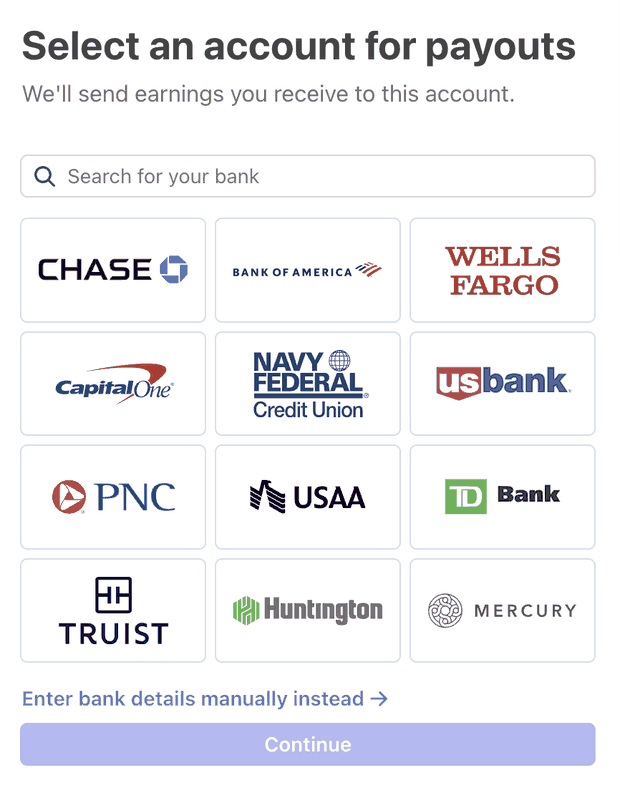
The “Enter bank details manually instead” link sits right below the bank list. -
Type in your details
Enter your bank's routing number and your account number. (You'll find both on a check, or in your bank's app under account or direct-deposit details.)
-
Continue, and you're set
Save it, and your payouts will go to that account — same as if you'd picked a bank from the list.
Common questions
My bank isn't in the list — can I still get paid?
Yes. Click “Enter bank details manually instead” and type in your routing and account numbers. Any US bank works.
What information do I need?
Your bank's routing number and your account number — that's it.
Where do I find my routing and account numbers?
On a physical check, or in your bank's app or website under account details or direct-deposit info.
Is entering my details manually safe?
Yes. Your bank details are handled securely by Stripe, Thryft Ship's payment processor — Thryft Ship never stores them.


