
How Exact Shipping Works
Want to charge your buyers the real shipping cost instead of a flat rate? The easiest way is right inside Thryft Ship Payments — there's a setting built exactly for it. Exact Shipping lets you collect the true shipping amount after the sale, without sending anyone off to Venmo or PayPal.
- Exact Shipping is a setting inside Thryft Ship Payments (Settings → Accept Payments → Payment, Shipping & Checkout Options), alongside flat rate and tiered.
- Your buyer pays for their items first; a shipping line shows up blank for you to fill in once you know the real cost.
- On shipping day you hit Add exact shipping cost, your buyer pays the shipping, and the order moves to Ready to Purchase.
When to use it
For most sellers we recommend flat or tiered shipping — it's simpler, and it's a single checkout for your customer. But we know some of you really want to charge the exact amount, so Exact Shipping is here for you. It's especially handy for mixed or heavier items, where a flat rate would over- or under-charge the buyer.
Turn it on
Head to Settings → Accept Payments → Payment, Shipping & Checkout Options and choose Exact Shipping. (You'll need Thryft Ship Payments turned on.) You can also pick it as your international method.
Works with any checkout
Exact Shipping works whether your customer checks out through the Sales Assistant or you send them a manual Thryft Ship link. It also works two ways, depending on who creates the order.
If you create the order
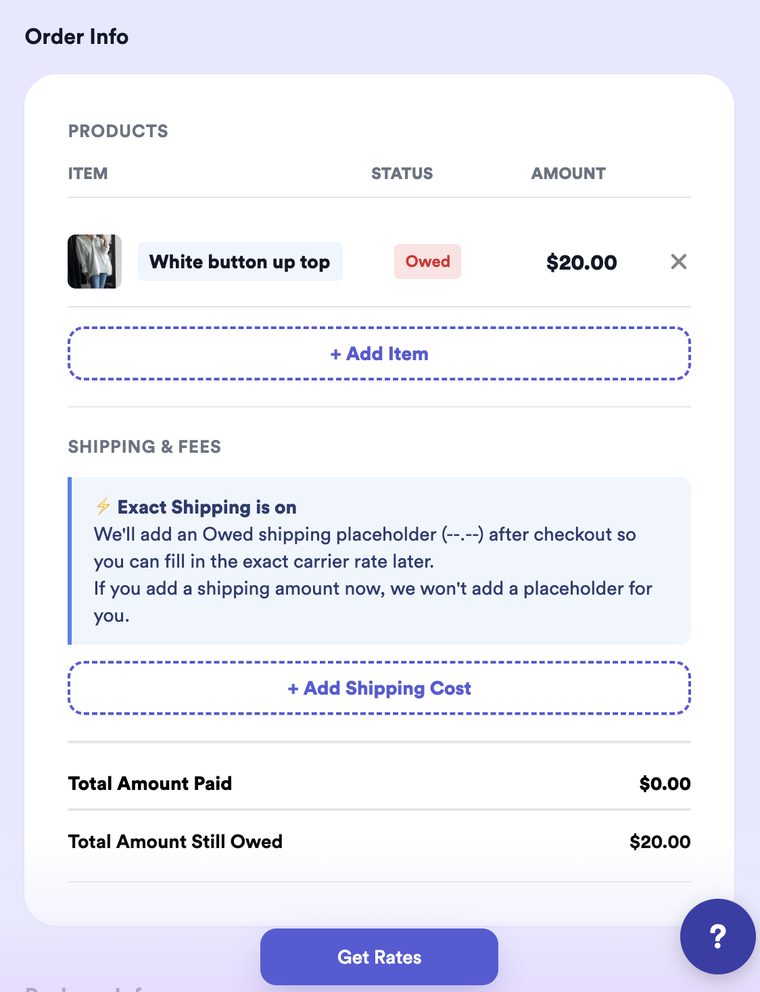
You build the order yourself in a few seconds — all you need is your buyer's Instagram handle, the item, and the amount owed. That's it. Your buyer fills in their own shipping address when they pay, so you don't collect it up front. (New to this? See How to Create a Manual Sale.) With Exact Shipping on, you don't set a shipping price up front — you'll see a note confirming that a blank shipping line gets added after checkout, so you can fill in the real carrier rate later.
If your customer creates it on your form
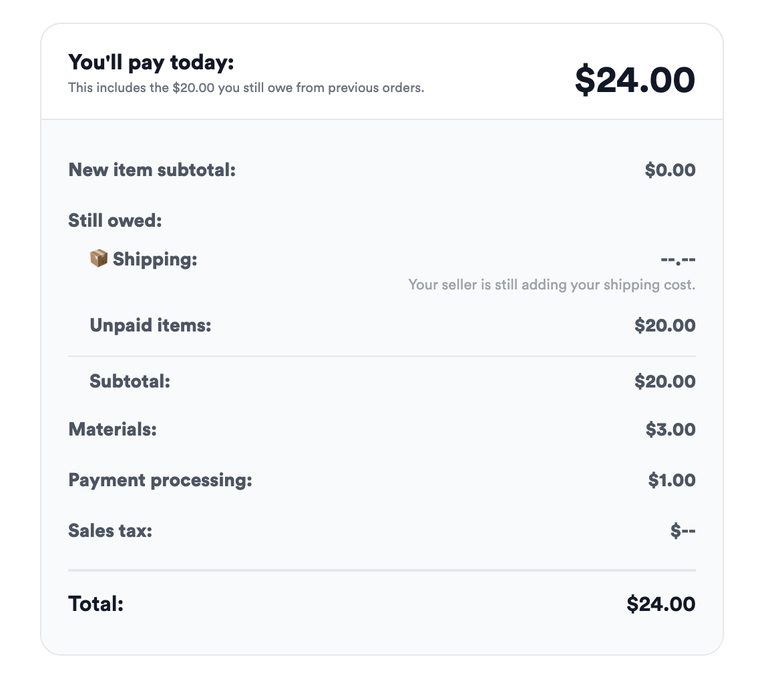
Your customer checks out through your link, enters their own shipping address, and pays for their items. (Setting up an order this way? See How to Create a Manual Sale — all you need to start is their Instagram handle, the item, and the amount owed.) There's nothing for them to do about shipping yet — you'll add the exact cost next, and they'll pay it after.
Adding the exact cost, step by step
1. Once items are paid, a blank shipping line appears
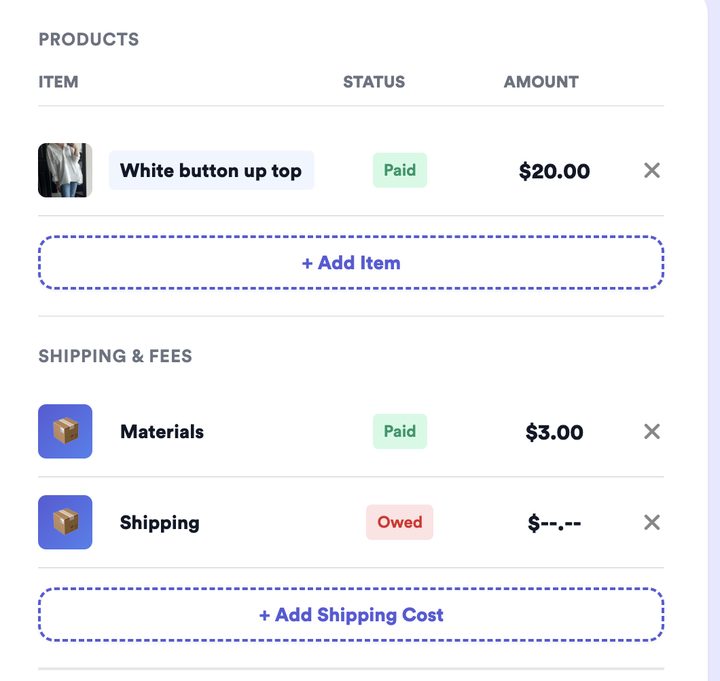
After your buyer pays for their items, the order carries a Shipping line marked Owed $--.-- (any materials markup is already paid). That blank placeholder is your cue that a real rate still needs adding — it only shows up after the items are paid.
2. Find it under "Shipping still owed"
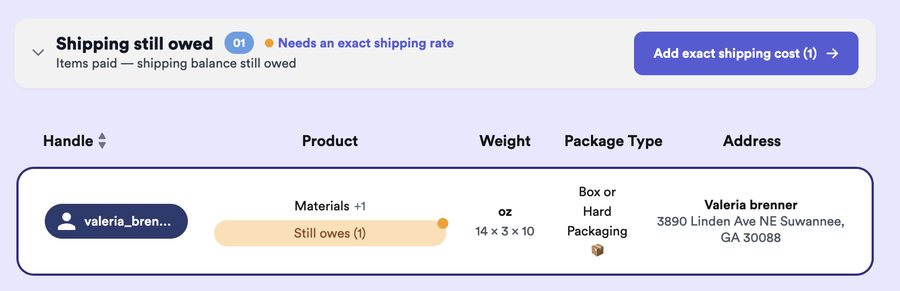
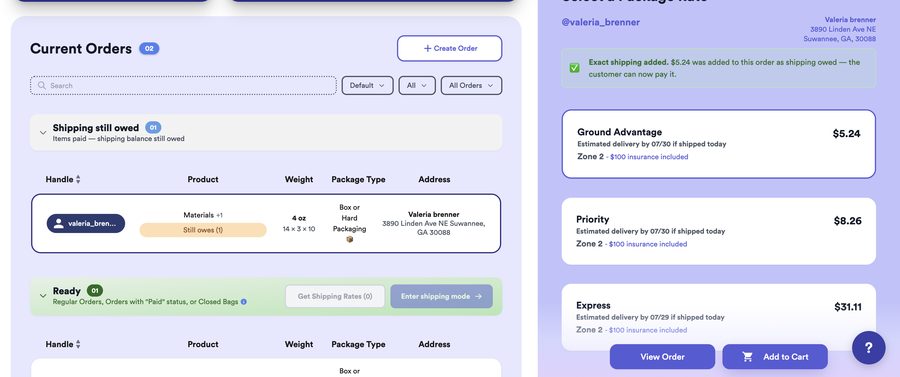
On your Orders page, these orders collect in the Shipping still owed section — items paid, shipping balance still owed. When you're ready to ship, click Add exact shipping cost.
3. Enter Exact Shipping mode
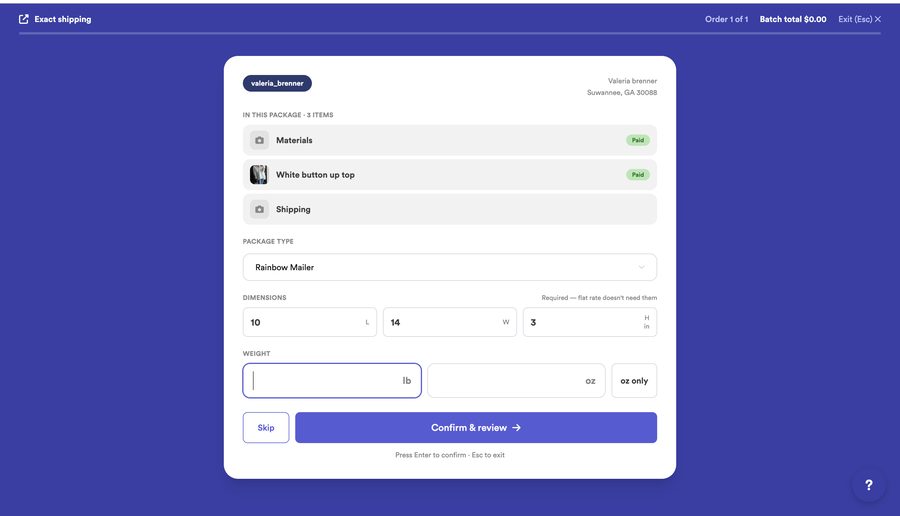
This works just like Shipping mode. For each order, confirm the package and enter the weight, then hit Confirm & review. It rapid-fires through every order in the section, so you're not clicking around one by one.
4. Review the rates and apply
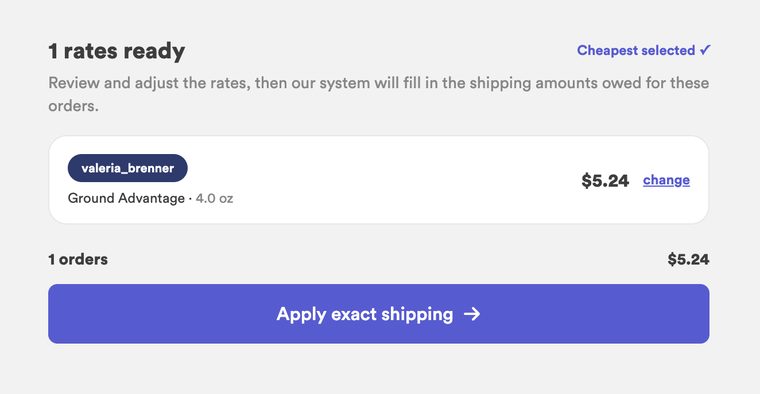
We pick the cheapest rate for you (you can change any of them), then click Apply exact shipping. The system fills in the shipping amount owed on each order automatically — no typing.
5. The cost is added — your buyer can pay
Each order now shows the exact shipping added, and your buyer can pay it.
6. Your buyer pays the shipping
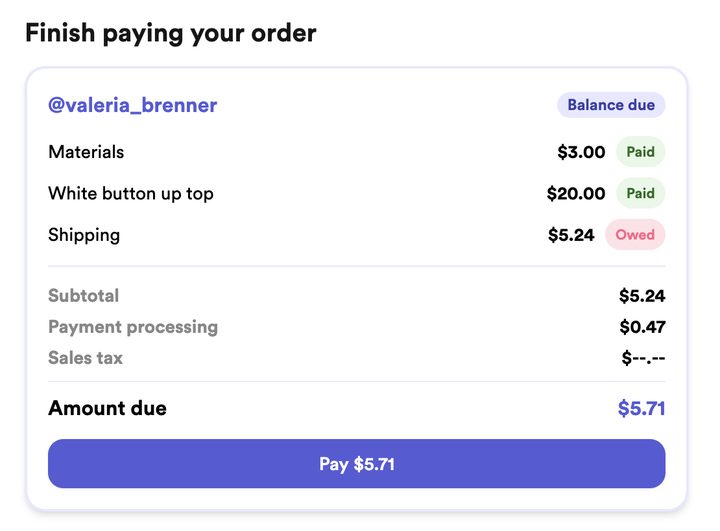
Send your Thryft Ship link back out (or tell them to head there). They see a simple "Finish paying your order" with just the shipping balance, and pay it.
7. It moves to "Ready" — time to ship
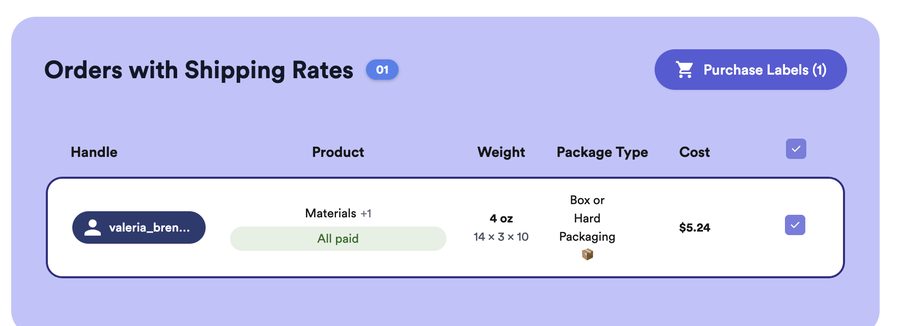
Once they pay, the order automatically moves to your Orders with Shipping Rates (Ready) section, marked All paid. Now just Purchase Labels and ship.
Materials markup
Want to charge a little extra for packaging and supplies? Add a materials markup — it shows as its own line and is paid together with the items.
Good to know
- Every item has to be paid first. If an item is still marked "Not Reviewed," the order stays in Pending — it won't move to "Shipping still owed" until every item is properly paid.
- Works internationally. Exact Shipping can be chosen as your international shipping method too.
Common questions
Does my buyer have to pay twice?
They pay for their items first, then the shipping once you've added it — both through the same simple link. If you'd rather charge one flat amount up front instead, use flat or tiered shipping.
Do you take the 2% fee on exact shipping?
No. The 2% applies to items sold only. Shipping generated through auto shipping (flat, tiered, or exact) isn't included — so you keep the full shipping amount.
What if I don't know the weight at checkout?
That's exactly what Exact Shipping is for — you fill in the real cost when you pack. On shipping day, Add exact shipping cost runs through all your Shipping still owed orders and pulls each rate for you, so you just confirm them.
Where do these orders live while I wait to add shipping?
In the Shipping still owed section on your Orders page — items paid, shipping balance still owed.
Can I use Exact Shipping for international orders?
Yes — it can be selected as your international shipping method.


