
How Automatic Shipping Works
Don’t want to type a shipping charge on every order? Turn on automatic shipping and Thryft Ship adds the right shipping charge for you, based on the rules you set once. It doesn’t look up an exact carrier rate — it applies the shipping rules you set to work out how much shipping to add to each order.
- You set the item and its price; Thryft Ship applies your rules to add the shipping charge.
- Turn it on in Settings → Accept Payments → Payment Settings.
- Choose flat rate, tiered, caps, domestic/international, or a free-shipping threshold.
- Local pickup is automatically excluded — no shipping is ever added.
What automatic shipping does
It splits the work between you and Thryft Ship:
The product
You add the item(s) and set the item price(s) on the order.
The shipping
Thryft Ship adds the shipping charge automatically, following the rules you set.
How to turn on automatic shipping
-
Open your payment settings
Go to Settings, select Accept Payments, then open Payment Settings.
-
Find the toggle and switch it on
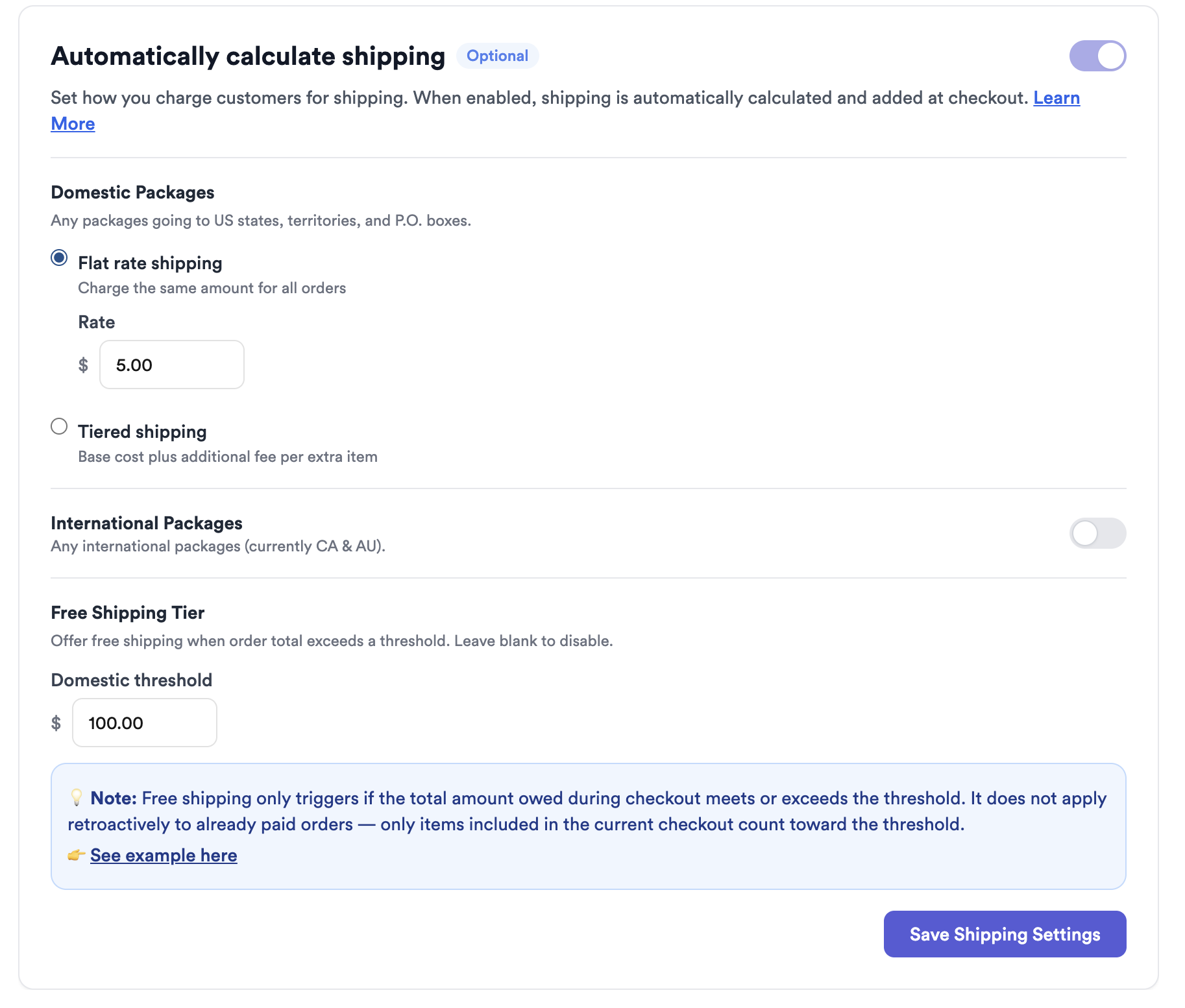
Scroll to Automatically calculate shipping and toggle it ON.
-
Set your rules
Choose how shipping should be charged — flat rate, tiered, a maximum cap, separate domestic/international rules, or a free-shipping threshold (all covered below).
Your rule options
Flat rate shipping
One set shipping price on every order — simple and predictable.
Tiered shipping (per item)
A base price plus a bit more for each additional item. For example, $6 base + $2 per additional item:
- 1 item → $6 shipping
- 2 items → $8 shipping
- 3 items → $10 shipping
Exact Shipping (real carrier rate)
Charge the true carrier cost instead of a set price. Your buyer pays for their items first, then you add the exact shipping once you know the weight — all through the same link, with no 2% fee on the shipping. It works whether you build the order or your customer checks out on your form. See How Exact Shipping Works for the full walkthrough.
Maximum shipping cap
Set a ceiling so shipping never climbs past a number you choose — handy with tiered pricing on large orders.
Domestic vs. international
Set different rules for domestic and international orders, so each is charged appropriately.
Free shipping threshold
Offer free shipping once an order’s total passes an amount you set. It’s evaluated per checkout, not across separate orders:
What happens to orders you already have
When you switch automatic shipping on, it starts working right away. It applies to all of your future orders, and to any existing orders that don’t already have a shipping charge recorded.
Say a customer has three items sitting in an open bag but hasn’t paid shipping yet. The next time they win an item, Thryft Ship looks at everything in their bag and automatically charges the shipping they now owe, based on your tiers.
Prefer to set shipping yourself?
You can always charge shipping manually instead — create an order, add your product(s) and price, and enter the shipping amount yourself. See How to Charge for Shipping and How the Shipping Line Item Works.
Common questions
Does automatic shipping charge local pickup orders?
No — local pickup is automatically skipped. No shipping rule runs and no shipping line item is added.
Can I still change shipping on a single order?
Yes — automatic shipping fills it in, but you can override the amount on any individual order before checkout.
Does the free-shipping threshold combine separate orders?
No. It’s checked per checkout, so two separate orders under the threshold won’t qualify even if they add up.
Want the full payments picture? See the complete Thryft Ship Payments guide.


