


How the Shipping Line Item Works in Thryft Ship Orders
Learn what the Shipping line item does, how it appears during checkout, and how it relates to automatic shipping rules.
In this article
What the Shipping Line Item Is
Inside every order, Thryft Ship lets you add a Shipping line item. This is simply a way to assign a shipping cost to an order.
If you accept Thryft Ship Payments
The shipping amount can be shown to your customer at checkout and included in the total they pay.
If you use third-party payments
You can still add shipping to keep track of what you charged (even if the payment happens elsewhere).
In plain English:
The Shipping line item is the number Thryft Ship uses to represent “shipping cost for this order.”
How It Appears for Customers at Checkout
If your customer is checking out with Thryft Ship Payments, the Shipping line item will appear as part of their checkout total.
- Items + item prices appear in checkout
- Shipping appears as its own line item
- The total reflects items + shipping
Tip: Keeping shipping as a separate line item makes checkout clearer for customers and easier for you to track.
How to Add a Shipping Cost Manually
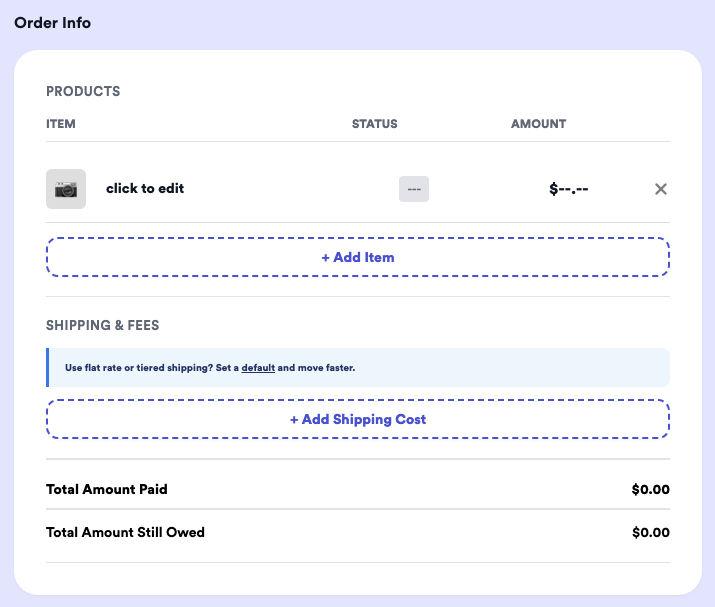
To add shipping to an order from your dashboard:
- Open the order
- Click + Add Shipping Cost
- Enter the amount (example: $8)
- Save
Good to know:
You can use manual shipping amounts for any policy you want — flat rate, tiered/per-item, or custom shipping per order.
Common Ways Sellers Use the Shipping Line Item
Flat rate (manual)
Example: Add $8 shipping on every order.
Simple and fast if you want full control per order.
Tiered/per-item (manual)
Example: $6 base + $2 per additional item (cap at $12).
Great for bundles; just calculate and enter the total as one shipping line item.
Charging exact shipping:
You can do this too — but it adds extra steps.
If you want the exact carrier rate, you’ll need all items + the customer’s address entered first, then use Get Rates.
Exact shipping workflow (if needed)
- Add all items to the order
- Make sure the customer’s shipping address is entered
- Click Get Rates
- Review rates
- Click Back to Edit Order
- Use + Add Shipping Cost and enter the amount you want to charge
Automatic Shipping Settings (Flat Rate, Tiered, Free Shipping Threshold)
If you want shipping to be calculated automatically during checkout (instead of manually entering it per order), you can enable Thryft Ship’s Automatic Shipping Calculation setting.
Automatic shipping supports:
- Flat rate shipping
- Tiered/per-item rules
- Domestic vs international
- Max shipping caps
- Free shipping thresholds
Learn more about automatic shipping
This guide walks through how the setting works and how to configure it.
Important Notes
Local pickup: If a customer selects Local Pickup, shipping will not apply.
The order total will reflect items only.
Manual shipping vs automatic shipping:
If automatic shipping is enabled, manually adding or editing a shipping line item will override automatic shipping for that order.
Need help choosing a shipping policy? Most sellers start with a simple flat rate or per-item tiered rule.

