
How to Link a Drop: Import Your Existing Instagram Posts
You don't have to post your drops through Thryft Ship to use the Sales Assistant. Link a drop points it at posts that are already live on your profile — it reads the comments, answers the bids, and builds every buyer's cart, exactly like a drop you posted here.
- Post your drop to Instagram however you like, then link it — no re-uploading, no reposting.
- Start a new drop and choose Link a drop (the “I post, Thryft tracks” option) instead of Create a drop.
- Give it a name, a drop type, and an end time — the things Thryft Ship can't read off Instagram.
- Pick your posts from the last 90 days, confirm, and the Sales Assistant catches up on the comments already there.
Why you'd link a drop
Three situations, and they're all common:
- You'd rather post it yourself. Some sellers just like their own flow — writing the caption in the Instagram app, or drafting and scheduling everything through Meta Business Suite. Linking means you don't have to change any of that to get the automation.
- You want video in the post. When you build a drop inside Thryft Ship, the item uploader takes photos — not video. So if you film a try-on for every item, post it yourself with the clip included and link that instead. You keep the video, and the Sales Assistant still reads every comment.
- You just turned the Sales Assistant on and your drop is already live. Posts up, bids landing, and you only connected the Assistant halfway through? Nothing to cancel and nothing to repost. Link the drop and it picks up every comment that's already sitting there.
How to link a drop
-
Start a new drop and choose “Link a drop”
Head to your Sales Assistant and start a new drop. You'll see two ways to run it: Create a drop (“Thryft posts for me”) or Link a drop (“I post, Thryft tracks”). Choose Link a drop and click Link my posts.
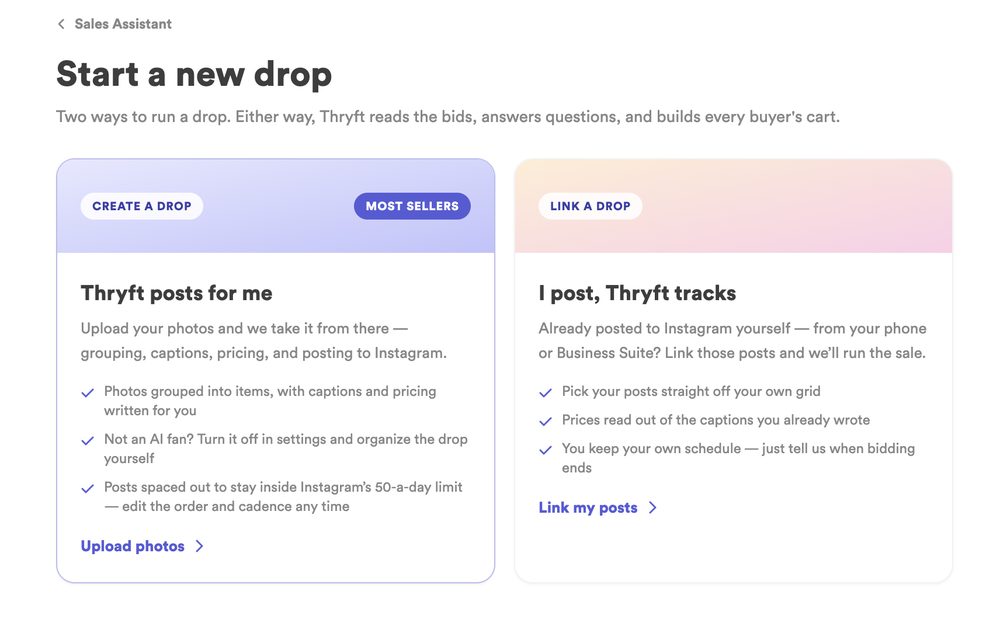
Choose Link a drop on the Start a new drop screen -
Tell us about your drop
Because these posts are already on Instagram, there are just two things Thryft Ship can't read from them: how bidding works and when it closes. Give your drop a name, choose a drop type (this tells the Sales Assistant how to read the comments on every post you link), and set when the drop ends. Then click Pick your posts.
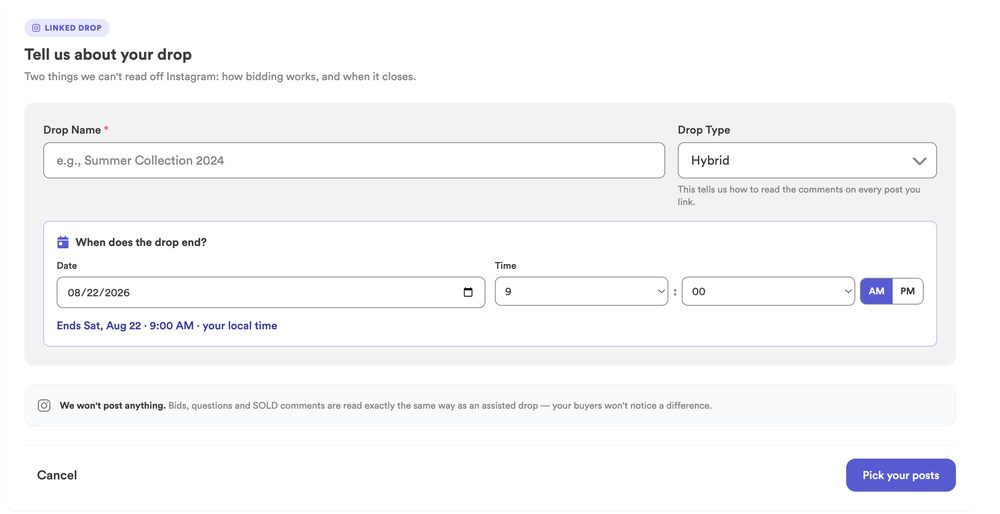
Name your drop, pick a drop type, and set when it ends -
Pick your posts from the grid
You'll see a grid of your Instagram posts from the last 90 days. Tap the ones that belong to this drop (tap again to remove one). Posts already in your inventory are tagged; anything new gets imported as a new item when you link. Just posted something and don't see it? Hit Refresh.

Tap the posts from the last 90 days to include them -
Verify, and let the Sales Assistant take over
Give everything a once-over to make sure it's right, then confirm. From that moment, the Sales Assistant reads all the comments already on those posts — bids, BINs, and SOLD/claims — responds to them, and keeps monitoring new comments in real time. It runs exactly like a drop you posted through Thryft Ship.
Good to know
- You choose the posts. Nothing gets swept in automatically — you tap the exact posts that belong to the drop.
- Linked posts don’t count toward your Instagram posting limit. Instagram caps what we can publish for you at 50 posts every rolling 24 hours — but posts you published yourself and linked are free. Bid tracking, winner selection and checkout messages all work the same on them. See How Many Items Can I Post at Once?
- Unsold items show up here too. Posts are tagged New, In Inventory or Unsold, and you can filter to show or hide the unsold ones — handy for pulling last week’s leftovers into this week’s drop. See What to Do With Items That Didn’t Sell.
- Edited a caption on Instagram? Use Re-analyze post on the item so we re-read it and pick up the new price or end time. We can’t see caption edits on our own.
- It goes back 90 days. The grid pulls your recent posts; use Refresh if you just posted. Items already in your inventory are tagged, and anything new imports as a new item.
- The drop type matters. It's how the Sales Assistant reads each post's comments (for example, bidding vs. buy-it-now), so pick the one that matches how you ran the sale.
- Video sits inside the post, never first. Lead with a photo, and keep it a feed post — standalone Reels aren't picked up.
- Scheduled-but-not-yet-posted items aren't supported yet. Link a drop works with posts that are already live. Pulling in Meta Business Suite posts that haven't gone out yet is something we're looking at for a future update.
Common questions
Will buyers be able to tell I linked the drop?
No. To your buyers, nothing looks different — they keep commenting on your Instagram posts like always. The Sales Assistant simply starts handling those comments behind the scenes, and Thryft Ship never posts anything itself.
What happens to bids that came in before I linked?
They're picked up. When you link, the Sales Assistant reads all the existing comments and processes them — so early bids, BINs, and claims are recognized and answered, not lost.
Why do I set an end time instead of it being automatic?
Because the posts are already live, Thryft Ship can't know from Instagram when you want bidding to close — so you tell it during setup. That, plus your drop type, is the only info it needs that it can't read from your posts.
Can I include my try-on video?
Yes — that's one of the best reasons to link instead of build. Post the item on Instagram yourself with your photos and your try-on clip, then link that post. Two things to keep in mind: a video can't be the first slide of a carousel, so lead with a photo, and it needs to be a regular feed post rather than a standalone Reel.


